
Introduction
To me, the key to using AI well isn’t knowing how to configure tools. It’s being able to take a real scenario and explain what you need, briefly but precisely. If you don’t know what you want, the AI doesn’t know either. You haven’t explained it clearly, its output doesn’t match your expectations, and then you blame it—which is no different from being chewed out by your boss for no reason.
Understanding Large Models
AI is an umbrella term covering rule-based systems, classical machine learning, deep learning, and more. Generative AI refers to systems that produce text, images, audio, and other content with a model. This article focuses on large language models within generative AI.
A large model is a neural network with a large number of parameters trained on a large amount of data. An LLM (large language model) is the subset specialized for language: text in, text out.
In daily use, you can treat a large model as a black box: you describe a task with text, an image, or a file, and it returns an answer. You don’t need to understand its layers, parameters, or internal computation first. The input to the black box is context; the output is a sequence of tokens.
The black-box framing has two implications. First, users don’t need to care about the implementation. Second, its behavior has boundaries: training data determines its knowledge, context determines what information is currently available, and the sampling strategy determines how random the output is. To understand those boundaries, we need to look one level down.
There is also a class of multimodal models that accept images, audio, and video in addition to text, encoding different modalities into a shared representation space. You send a screenshot of an error and ask “what does this mean?”, and the model reads both the text and the image. But being able to see an image does not mean it can accurately read small text and numbers. We will come back to that in the image-reading section.
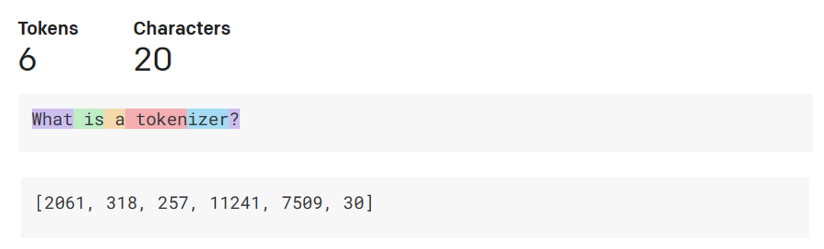
Figure: token and character boundaries do not line up. Source: Microsoft Generative AI for Beginners, MIT License.
Before text enters a model, a tokenizer splits it into tokens. A token can be a word, a subword, a number, or a punctuation mark; in Chinese, one token usually covers one or two characters, while indentation and symbols in code have their own splitting rules. Context length and API billing are both measured in tokens.
Large language models generate autoregressively. Given a sequence of preceding tokens, the model estimates the conditional probability P(x_{t+1} | x_1, …, x_t), samples the next token, appends it to the sequence, and repeats until it emits an end-of-sequence token or reaches the length limit. At inference time, the output is essentially one sampled trajectory through that chain of conditional probabilities.
A single-step prediction contains no explicit logical reasoning. Model capability comes from training at scale: once parameters, data, and compute reach a certain level, the model learns syntax, factual associations, code structure, and transferable patterns under the training objective of compressing text. Instruction tuning and reinforcement learning from human feedback shift the generation goal from “continue the text” to “follow instructions and give a useful answer,” but the model still has no independent fact database and no built-in fact checker.
Hallucination is therefore an inherent risk of the generation mechanism. The model optimizes for plausibility under a conditional probability distribution, not for propositional truth; the more fluent the output, the more you need to verify numbers, dates, legal clauses, and API signatures against primary sources.
I don’t recommend asking a model to do arithmetic without producing a program that computes the result. Models are insensitive to magnitude and exact numerical calculation, and you cannot absorb the losses caused by a wrong number. I also want to be explicit about one point: large models do not truly understand. The scale effect of prediction makes them look as if they do.
These properties impose three direct limits. A model’s answer is grounded only in the statistical priors in its parameters and the current context; if project data, business rules, and field definitions are not in the context, it cannot reliably infer them. Fluency in natural language is not evidence of correctness, so key conclusions still need to be checked against primary sources. Multi-step arithmetic, aggregation, and state tracking are better delegated to Python, a calculator, or a database, with the model choosing the tool and explaining the result.
Context and Context Pollution
The context window is the maximum number of tokens a model can process in one request. It includes the system prompt, conversation history, retrieved documents, tool outputs, and the current question. It is the model’s working memory.
A larger window does not mean better utilization. Attention is diluted by irrelevant content, and when key information sits in the middle of a long context, recall drops noticeably—a phenomenon usually called “lost in the middle.” In practice, put hard constraints at the beginning and the current task plus acceptance criteria at the end.
Context pollution means irrelevant, stale, contradictory, or untrustworthy content enters the context and interferes with the model’s judgment. Common sources include dumping an entire knowledge base or the full chat history into the window; retrieving an outdated version of a document; tool outputs containing error stacks or embedded instructions; mixing intermediate results from multiple subtasks; and prompt injection in web pages or files.
The first step in controlling pollution is to define the task boundary and authoritative sources: decide which materials are the reference, and when they conflict, prefer the newer version or timestamp. For long documents, retrieve, summarize, and chunk first, and put only the necessary fragments into the window. Label sources so official documentation, historical records, tool outputs, and user input are distinguishable; treat external text as data, never as instructions.
As a session grows, keep conclusions, constraints, and open items, and discard process noise. Start a new session or explicitly reset context when switching tasks. Exploratory work can be delegated to a subagent that handles retrieval and trial and error, bringing only conclusions back to the main context. For critical conclusions, reread the citations, numbers, and API usage and verify them a second time.
Hello-Agents describes an agent’s environment as partially observable: the agent can only obtain local information through sensors and must rely on memory and exploration to fill in the state (Chapter 1). For an LLM application, context is working memory; pollution is equivalent to writing a wrong observation into memory, and every subsequent step inherits the error.
Using AI for Data Analysis
Suppose you are helping a teacher organize midterm grades, or tallying sign-ups for a student club. You have an Excel file with a few hundred to a couple of thousand rows, and the columns are just student ID, name, class, subject, score, and an absent flag. You can filter and write simple formulas in Excel, but pivot tables get tedious; you have heard of pandas but never really written Python.
This kind of spreadsheet is a good place to start: the data is small, the rules are clear, and you can check the result directly in Excel. You can write the request like this:
I have an Excel file: midterm_grades.xlsx, about 1,200 rows, one sheet.

Columns:
- student_id
- name
- class
- subject
- score (0-100, empty for absent)
- absent (0/1)

First 5 rows:
(paste)

Requirements:
1. Calculate average score and pass rate (pass = 60) by class and subject
2. List students who were absent or have an empty score
3. Rank classes by total score

Output:
- a runnable Python script using pandas
- print validation results: row count, missing values, duplicate student IDs
- write results to xlsx files under output/
- add English comments explaining each pandas operation
You mainly need to specify three things: the file path and columns, the business rules (pass mark, whether an absence counts as zero, whether ranking uses total or average), and the output format. Up to a few thousand rows, pandas is more than enough.
When the script comes back, first check that the row count matches Excel, then check for duplicate student IDs, scores outside 0-100, and inconsistent absent flags. Pick one class and one subject, compute the result with an Excel pivot table, and compare it with the script. Once that checks out, ask the model to turn the validations into assertions:
assert df['student_id'].is_unique, "duplicate student IDs"
assert df['score'].dropna().between(0, 100).all(), "score outside 0-100"
assert set(df['absent'].dropna().unique()) <= {0, 1}, "invalid absent flag"
Assertions only catch data-level errors; business definitions still need human confirmation. The pass mark, how absences are counted, and the ranking rule must come from you. The model only executes them.
You can complete this workflow without knowing Python. Ask the model to comment the code, and when you don’t understand a groupby or merge, ask a follow-up question. The next time you face a similar task, you can adjust the parameters yourself. That is more realistic than finishing a full pandas course before touching the spreadsheet.
A web-based code interpreter is fine for one-off work, local Jupyter is better for repeated use, and an API or Agent suits fixed reports. For a few thousand rows, any of them works. Get the task done first.
Web Search and Image Reading
Web search is often misunderstood as the model browsing the web in real time. The actual process is retrieval: the model generates search queries, the search service returns titles, snippets, and links, the system fetches page text, splits it into fragments, filters out irrelevant material, and inserts the selected fragments into the context. The model then answers from that text and attaches citation numbers.
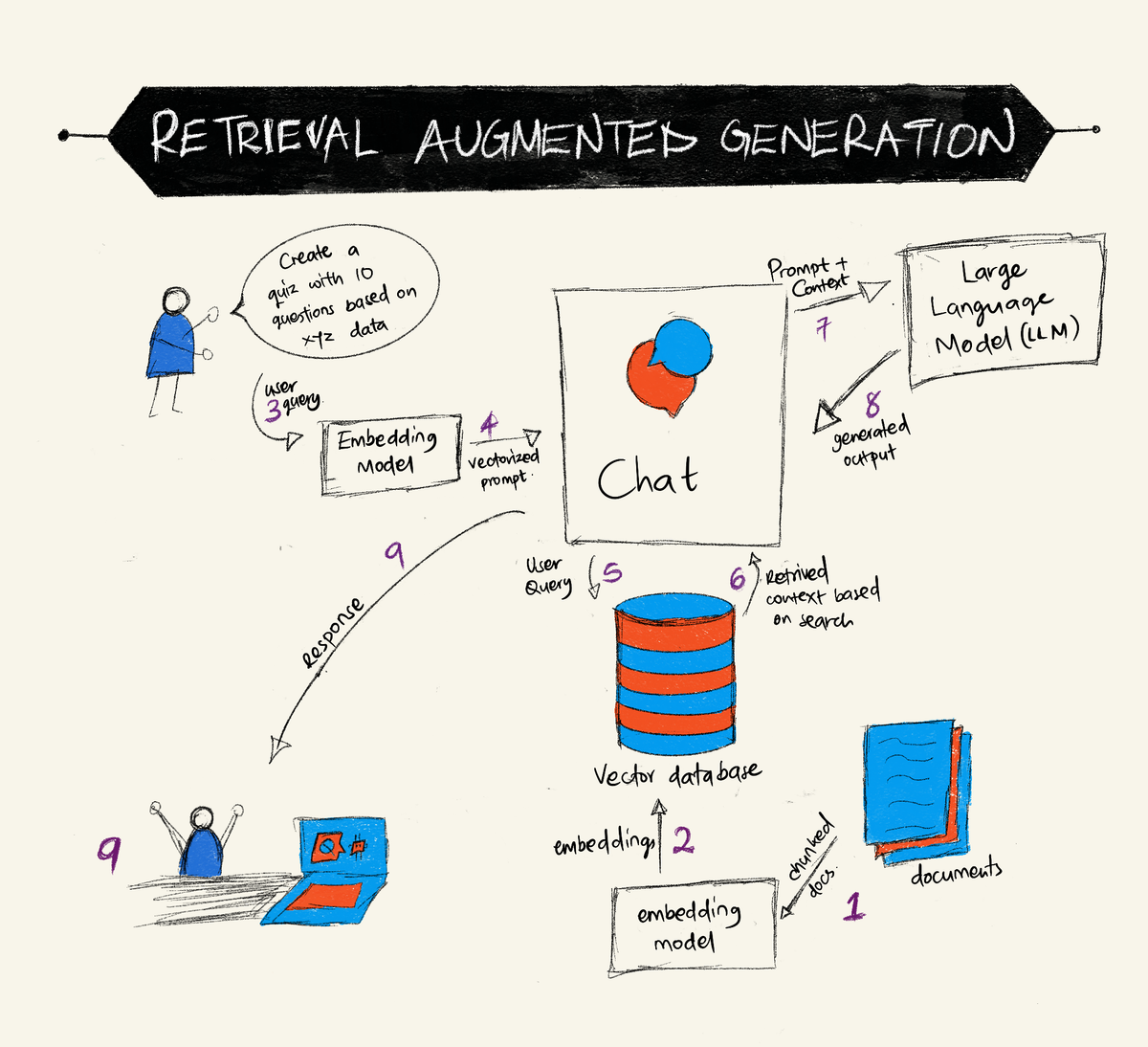
Figure: a typical RAG workflow. Source: Microsoft Generative AI for Beginners, MIT License.
Web search can be viewed as a special case of RAG: replace the vector store with a search engine. In this pipeline, the model reads the retrieved results and generates an answer; reliability depends on the quality of the sources and the retrieved fragments.
This imposes several limits. Source quality determines answer quality. Indexes go stale. Pages behind a login, heavily dependent on JavaScript, or behind a paywall often cannot be fetched. Citations can be mismatched, so always open the important ones yourself. Search is appropriate for policies, prices, current documentation, and unfamiliar areas; for stable background knowledge, or when you already have the primary document, giving the file to the model is more accurate.
The multimodal models mentioned earlier process an image by cutting it into fixed-size patches, encoding each patch into a vector with a vision encoder, and mapping those vectors into the same space as text tokens. To the model, the image becomes a sequence of “visual tokens” that can be attended to alongside text in the same context.
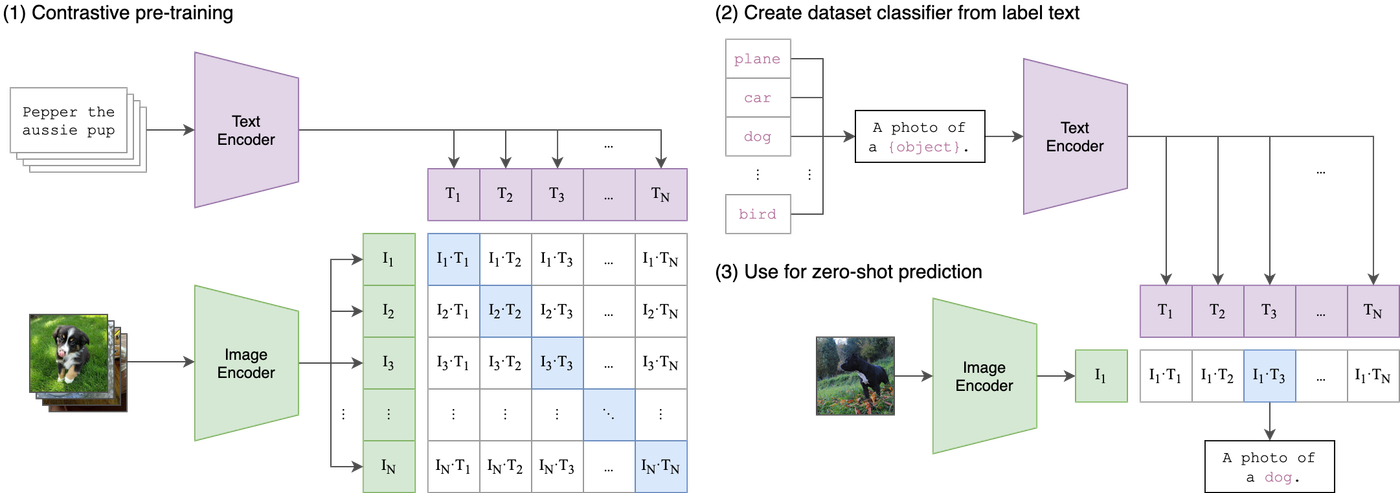
Figure: text and image encoders map both inputs into a shared vector space, where similarity is computed. Source: OpenAI CLIP, MIT License.
It can judge overall layout, recognize objects, read larger text, understand chart trends, and grasp the rough structure of a UI screenshot. It is weak at small text, exact numbers in dense tables, dimensions on engineering drawings, and rotated or blurry images. Ask it to read the amount on an invoice and it may return a well-formatted but wrong number. “Supports images” and “can read images accurately” are two different claims.
When you need exact text, use OCR: convert the image to text with PaddleOCR, Tesseract, or a cloud document-recognition service, preferably preserving coordinates and paragraph structure; assemble the result into Markdown or plain text in reading order; then hand it to the language model for summarization, extraction, or classification.
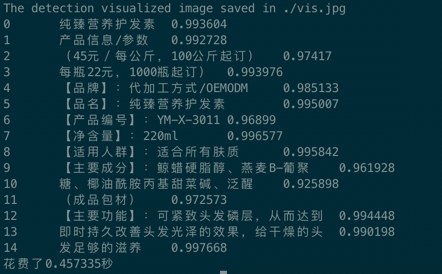
Figure: PaddleOCR output with text lines and confidence scores. Source: PaddleOCR, Apache-2.0.
OCR is often the more reliable choice in engineering work: character-level accuracy is high, results are auditable, cost is low, and it plugs into existing document pipelines. The hard cases are complex layouts—multiple columns, tables, handwritten notes—where you need layout-aware OCR or a combination of a vision model and OCR cross-checking. For CAD drawings, OCR reads only the text in title blocks and annotations, not the geometry.
Choosing a Model
Model names generally follow the same structure: vendor / family / tier / version / date snapshot. Take claude-opus-5-5: Claude is the family, Opus is the capability tier, and 5.5 is the version. In deepseek-v4-pro, deepseek is the family, v4 is the generation, and pro is the tier. Some APIs add a date suffix such as -2026-08-01, meaning the weights from that day; behavior may differ from last month.
Tiers usually map to cost and speed: mini / flash / haiku are cheap and fast, suitable for classification, extraction, and simple Q&A; the standard tier is the default for most tasks; pro / opus / max are expensive and slow, suitable for complex reasoning, long-document analysis, and code refactoring. Numbers in model names are not comparable across vendors—don’t assume a 5 is stronger than another vendor’s 4.
As of October 2026, OpenRouter’s catalog lists 469 models. Here are a few representative ones. Prices are OpenRouter list prices on that day, in USD per million tokens:
| Vendor | Representative model | Context | Input / output |
|---|---|---|---|
| Anthropic | Claude Opus 5.5 | 1M | $4 / $20 |
| OpenAI | GPT-6.1 Sol | 1.05M | $2 / $10 |
| Gemini 4 Argon | 1.05M | $2 / $10 | |
| DeepSeek | V4.1 Flash | 1M | $0.15 / $0.60 |
| Alibaba Qwen | Qwen3.8 Max | 1M | $2 / $6 |
| Moonshot | Kimi K3.1 Pro | 1M | $2 / $10 |
| Zhipu | GLM-5.3 Flash | 1M | $0.15 / $0.50 |
| xAI | Grok 4.7 | 500K | $2 / $6 |
| Meta / Mistral | Llama 4 Scout | 1.3M | $0.10 / $0.30 |
Only one representative model per vendor is listed. Most vendors also have cheaper small tiers (Haiku, Flash, Luna) and more expensive Pro / Opus / Max tiers, with prices differing by dozens of times. Prices change daily, and the same model may differ in price, quantization, and availability across providers, so treat this table as a signpost only.
Strengths differ as well: Anthropic is steady on long documents and tool use; OpenAI has the most complete ecosystem and mature multimodal and function calling; Google differentiates with native audio and video input; DeepSeek wins on price and dual protocols; Qwen, GLM, and Llama open weights suit private deployment; Kimi leans toward agentic coding; Grok is tightly integrated with real-time information.
OpenRouter is a model aggregation platform. Register an account, get an API key, and you can call dozens of vendors through an OpenAI-compatible interface. Its main job is routing: the same request is sent to different providers based on price, latency, and availability, with automatic failover if one provider goes down. Model pages show context length, input types, pricing, supported parameters, and the provider list, which makes comparison easy. But list price is not necessarily your billed price, data policies matter, and production systems should still rely on the vendor’s official documentation and SLA.
Six factors drive model selection: task difficulty, context length, whether you need images or tool calls, latency, data compliance, and budget. For a daily coding Agent, use the DeepSeek Flash / Claude Sonnet / GPT-6 Luna tier; for complex refactors and long reviews, use Opus, Sol, Kimi Pro, or Gemini Argon; for bulk classification, use Haiku or Flash; if data cannot leave the country, deploy open weights yourself. Benchmarks measure someone else’s tasks; your task is the final benchmark.
What Is an Agent?
Everything so far has been single-turn Q&A: you ask, it answers. An Agent is different. It moves forward on its own inside a loop.
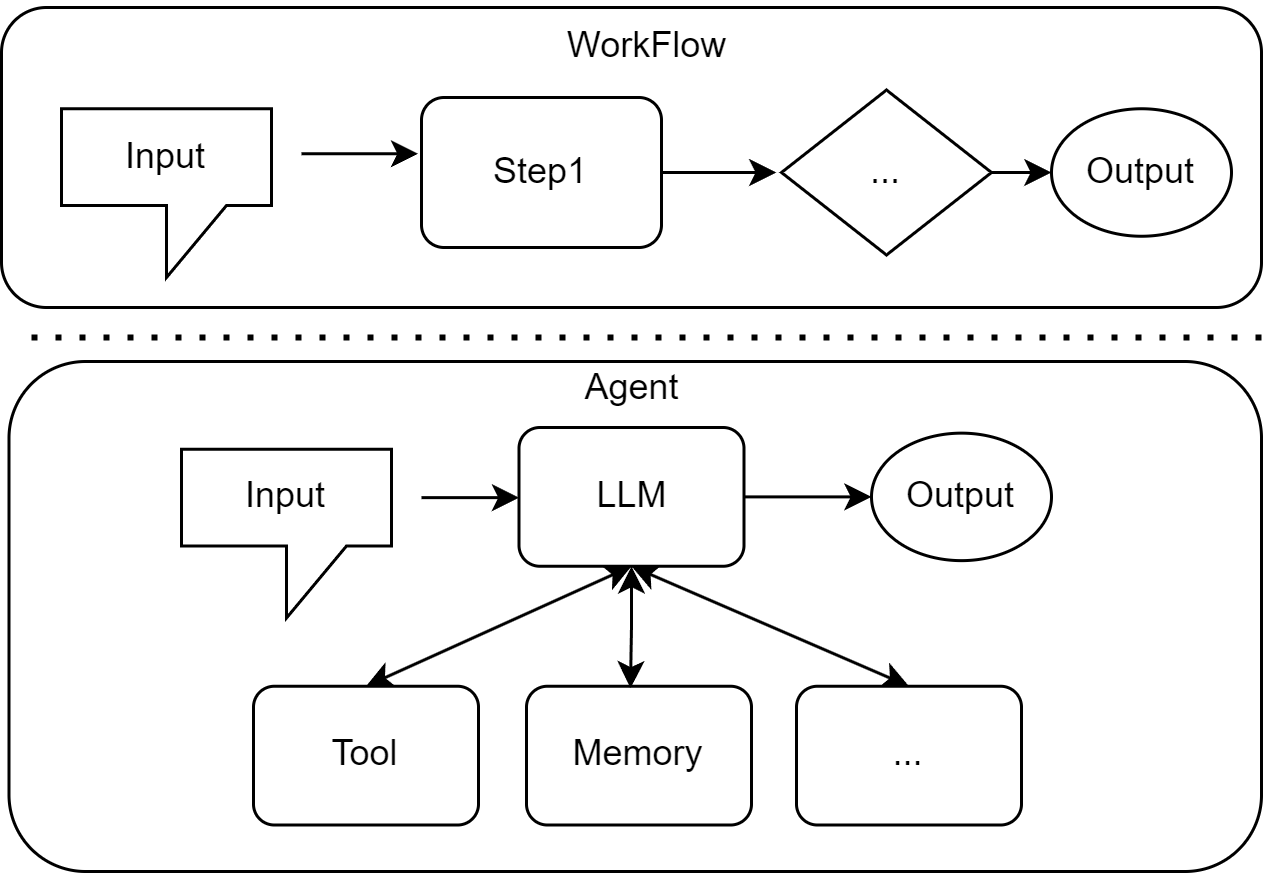
Figure: a workflow follows fixed steps; an Agent lets the LLM decide which tool to call and when to stop. Source: Datawhale, Hello-Agents, Chapter 1, CC BY-NC-SA 4.0.
Datawhale’s Hello-Agents offers a clear starting point: an agent is any entity that perceives its environment through sensors and autonomously acts through actuators to achieve a goal. In LLM terms, the sensors are user input and tool returns, and the actuators are function calls, code execution, and API requests.
Its operating mechanism is a loop:
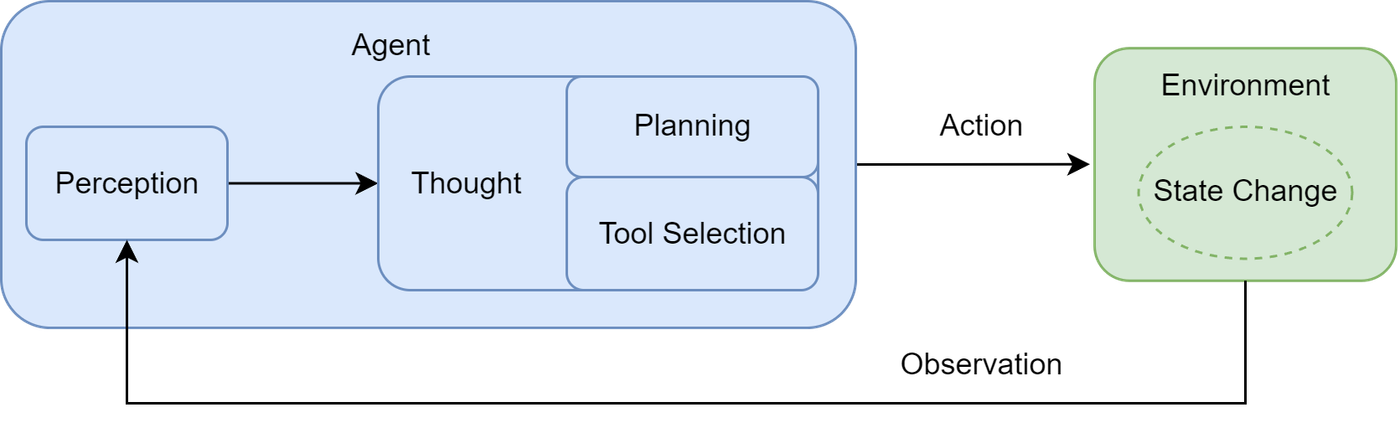
Figure: perception → thought (planning, tool selection) → action → environment state change → new observation. Source: Datawhale, Hello-Agents, Chapter 1, CC BY-NC-SA 4.0.
In engineering, this is often implemented with the Thought-Action-Observation protocol. The model emits a Thought and an Action, an external parser executes the Action, and the result is wrapped as an Observation and fed back:
Thought: The user wants the weather in Beijing. I need to call the weather tool.
Action: get_weather("Beijing")
Observation: Beijing is sunny, 25°C.
A minimal Agent skeleton looks like this:
context = [system_prompt, user_goal]

for step in range(max_steps):
    thought, action = llm(context)
    if action.name == "finish":
        return action.answer
    result = tools[action.name](**action.args)
    context += [thought, action, result]
It looks simple, but the hard parts are outside the loop: how tools are defined, how permissions are restricted, how failures are retried, and when to stop. The barrier to an Agent is not the model; it is tool and boundary design.
An Agent is more capable than a chat box, and more dangerous. Common failure modes: infinite loops, where a tool keeps failing and the model retries with different parameters, burning tokens without progress, so set a maximum number of steps and a total budget; tool misuse, with wrong parameter types or calls to the wrong endpoint, so write clear tool descriptions and validate arguments; prompt injection, where a web page or file contains “ignore previous instructions” and the model actually follows it, so treat external content as data, not instructions; overreach, deleting files, changing databases, or sending messages, so dry-run write operations first and whitelist dangerous commands; and overconfidence, claiming “done” when only half the work is complete, so require verifiable artifacts such as passing tests, existing files, or a command returning 0.
To understand Agents end to end, I recommend Datawhale’s Hello-Agents. It is open source, written in Chinese, and goes from concepts to code. Chapter 1 covers the evolution of traditional agents, the new LLM-agent paradigm, and the Thought-Action-Observation protocol in detail, then walks you through a first Agent with a “smart travel assistant.”
- Project: github.com/datawhalechina/hello-agents
- Online book: datawhalechina.github.io/hello-agents
- Chapter 1: hello-agents.datawhale.cc
If you only read one chapter, read Chapter 1. If you want to build something, type through the code in Section 1.3. That is worth more than ten blog posts.
What Are Skills and MCP?
An Agent can run on its own, but it lacks two things: experience in “how this should be done,” and hands that can reach external software.
A Skill packages the steps, standards, templates, and checklists for a class of tasks so they can be reused next time. It solves the “teach it from scratch every time” problem. A Skill is usually a folder:
weekly-report/
├── SKILL.md              # when to use it, steps, hard rules
├── reference/
│   └── metrics.md        # metric definitions, field notes
├── scripts/
│   └── build_report.py   # runnable script
└── assets/
    └── template.xlsx     # template file
SKILL.md records rules that can be executed directly: where to read data, which definitions to use, which template to apply, and which self-check script to run when finished. If you have done a task more than three times and it has clear steps, standards, or a checklist, it is worth turning into a Skill; a one-off task is not. The difference between a Skill and a prompt is that a prompt is a message in a chat log, while a Skill is a versioned, shareable engineering asset that can carry scripts and attachments. The experience of senior colleagues often settles into these rules.
MCP (Model Context Protocol) is a protocol that lets model clients connect to external tools and data. An MCP server exposes the capabilities of some software, and the client calls them. No matter how smart the model is, it cannot see your database, file system, browser, or CAD software; MCP is the wire.
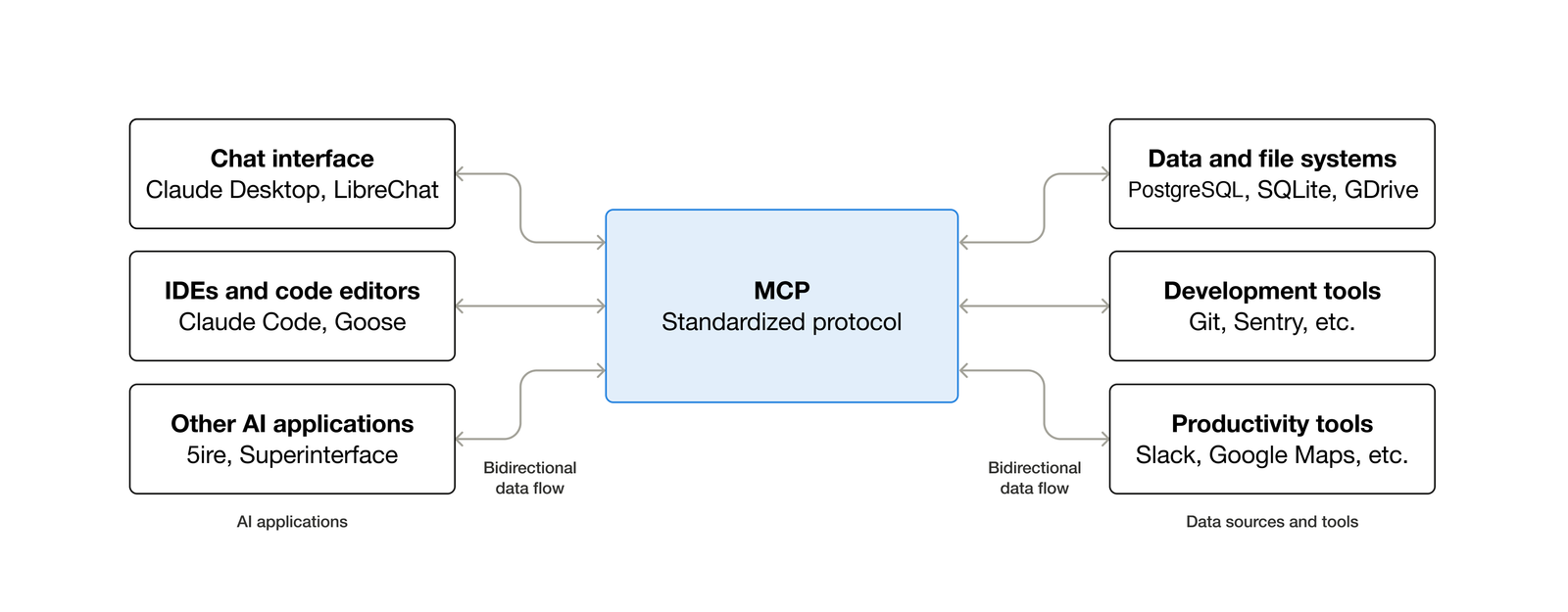
Figure: MCP provides a common protocol between AI applications and data sources or tools. Source: Model Context Protocol documentation, CC BY 4.0.
An MCP server typically offers three kinds of things: Tools are callable functions such as read_file, query_db, and run_command; Resources are readable data such as files, table schemas, and configuration; Prompts are preset prompt templates. Transports include stdio and HTTP; stdio suits local tools, HTTP suits remote services. Set security boundaries from the start: read-only first, writes later; authorize dangerous tools separately; log every call; and never hand production database write access directly to an Agent.
This article covers what Skills and MCP do, not the installation steps. Loading differs by client: Claude Code uses claude mcp add or a project .mcp.json, Codex is configured in ~/.codex/config.toml, and Claude Desktop uses claude_desktop_config.json; Skills also need to be placed in the directory and format expected by each client. For exact commands, parameters, and permission settings, follow each project’s README and the client documentation.
For a complete MCP setup on real software, see my earlier post MATLAB 2025a + MCP: Claude Code and Codex configuration notes. It walks through obtaining the MCP server, configuring it over stdio in Claude Code and Codex, and the actual calls and pitfalls. MATLAB and CAD here follow the same structure: the server exposes software capabilities, the client calls them, and a Skill captures the team’s standards.
Here is a way to remember the relationship: MCP is the interface, a Skill is the method, and an Agent is the person doing the work. One Agent can load multiple Skills and call different software through multiple MCP servers; you can also have MCP without an Agent; conversely, a Skill without MCP is usually a well-written prompt plus scripts. Don’t force all three in just to complete the conceptual set.
Take a professional-software example. Ask AI directly to “draw a standard title block” and it will give you code. The problem is that it does not know your company’s layer naming, line types, or dimension styles; it cannot see what is already in the current drawing; it does not know which version you use; and once it generates the code, it stops—it does not execute or check anything. MCP solves “cannot reach”: a CAD MCP server can read layers, blocks, entities, and annotations, execute commands, batch-modify properties, and export inventories. A Skill solves “does not know the rules”: write the layer whitelist, annotation text height, title-block position, drawing-number format, and pre-plot checklist into a Skill, so every newcomer can call the same experience as a senior engineer.
A complete workflow looks like this: read the drawing → generate a mapping from old to new layer names → produce a dry-run report → after your confirmation, apply changes to a copy → run the self-check script → have a human spot-check critical drawings. AI handles repetitive work and rule comparison; humans confirm definitions and final quality. The same structure transfers to any software with an API, COM interface, or plugin system: MATLAB, Revit, SolidWorks, Photoshop, Excel, Blender. The boundary is also the same: whether the geometry makes sense, whether the structure is safe, and whether the title block can be signed off are still engineering decisions.
Set Up an Agent with DeepSeek
I use DeepSeek as the example because it is beginner-friendly: pay-as-you-go with no subscription, both OpenAI and Anthropic API formats, a 1M-token context, and low prices for cheap experimentation.
It currently has two main models: deepseek-flash (V4.1-Flash-1017, supports image input) and deepseek-v4-pro (V4-Pro-0813, text only). Both have a 1M context and up to 384K output, with tool calls and JSON output. Prices are per million tokens in CNY, with idle and peak rates (peak is Monday–Friday, 9:00–12:00 and 14:00–18:00 Beijing time; other times are about half price):
| Model | Input (cache hit) | Input (cache miss) | Output |
|---|---|---|---|
| deepseek-flash | ¥0.02–0.04 | ¥1–2 | ¥4–8 |
| deepseek-v4-pro | ¥0.15–0.30 | ¥4.5–9 | ¥13.5–27 |
Editing environment variables, settings.json, and config.toml by hand is tedious and easy to get wrong; you can also lose existing configuration. I recommend CC Switch (ccswitch.io, GitHub farion1231/cc-switch) to manage it. It is a free, open-source desktop app with built-in provider presets such as DeepSeek, and it switches Claude Code, Codex, and other tools with one click. It replaces only the endpoint, key, and model fields, preserving plugins, hooks, MCP servers, and comments you added yourself.
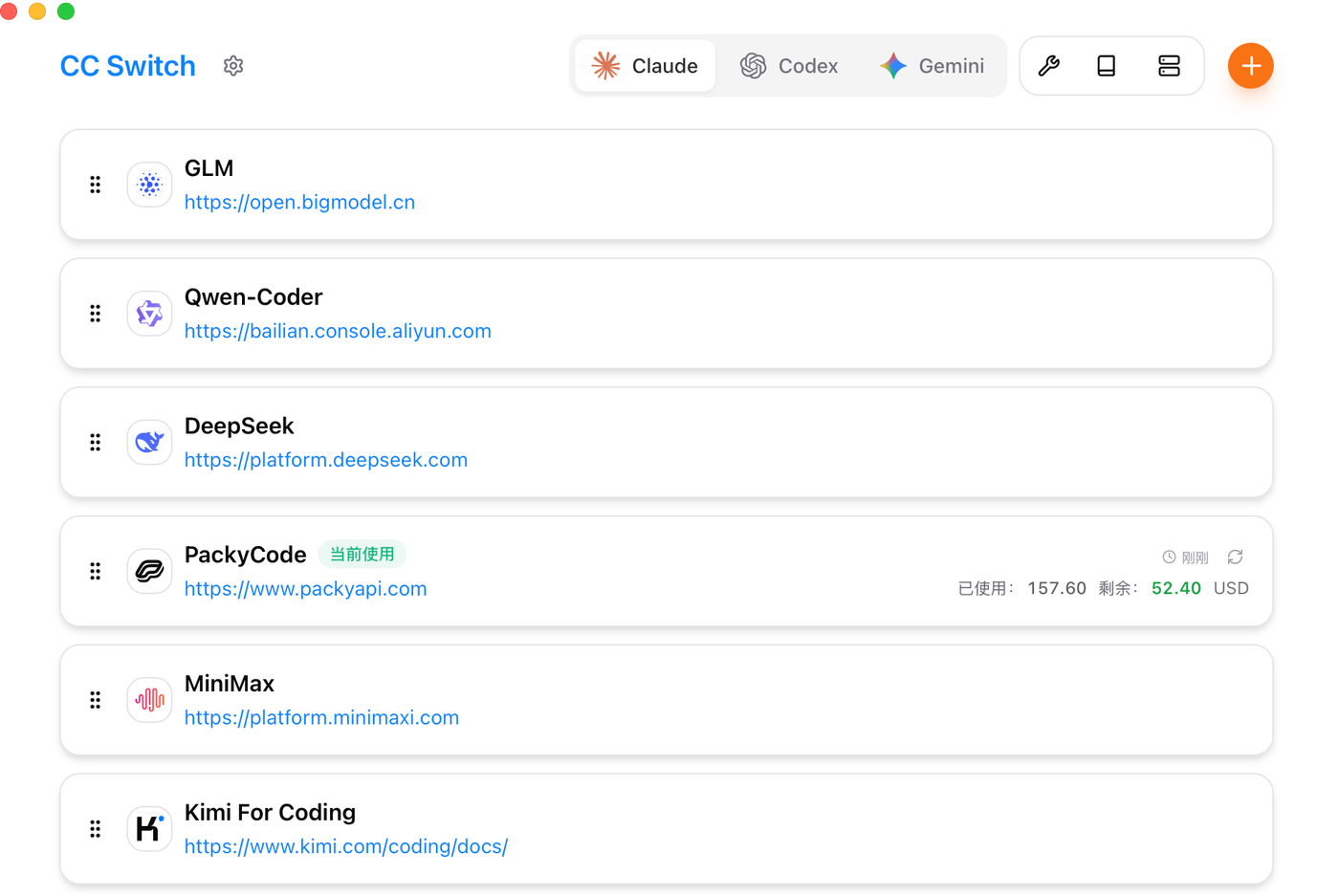
Figure: CC Switch main window. Switch tools at the top, view providers on the right; click ”+” to add and “Enable” to switch. Source: CC Switch, MIT License.
Install Node.js (the LTS release from nodejs.org; on Windows, Claude Code also needs Git for Windows), then install the two CLIs: npm install -g @anthropic-ai/claude-code and npm install -g @openai/codex. After installation, run claude --version and codex --version once to confirm they start and create their configuration directories. If PowerShell on Windows says “running scripts is disabled,” use npm.cmd and npx.cmd instead, or adjust the ExecutionPolicy according to Microsoft’s documentation.
Then download the Windows .msi installer from Releases (on macOS, use brew install --cask cc-switch). On first launch, CC Switch imports your existing configuration as default, so nothing is lost.
Next, register at platform.deepseek.com with a phone number or email and sign in. In the console, start with “Top up” on the left: DeepSeek is pay-as-you-go with no monthly plan, so you add credit and spend it down, and common mobile payment methods are supported. You can check your balance and each charge on the billing or usage page. Don’t top up much at first; enough for a few test runs is fine. Check the official “Models & Pricing” page for current prices.
Then open “API Keys” on the left, click “Create API Key,” name it as prompted, confirm, and copy the string beginning with sk-. The full key is shown only once; once you close the page you cannot see it again, and if you lose it you must delete and recreate it. Store it in a password manager, and never put it in a code repository, screenshot, or chat message.
Once you have the key, go back to CC Switch. If the menu names in the console differ slightly from this description, follow the actual DeepSeek platform interface. To verify the key first, send a minimal request using the curl example in the official documentation; a 200 response with normal JSON means the account and balance are fine.
Claude Code: Open CC Switch, select Claude at the top, click ”+” in the upper right, choose DeepSeek under “Add Claude Code provider,” paste the API key, click “Add,” and then click “Enable” in the list.
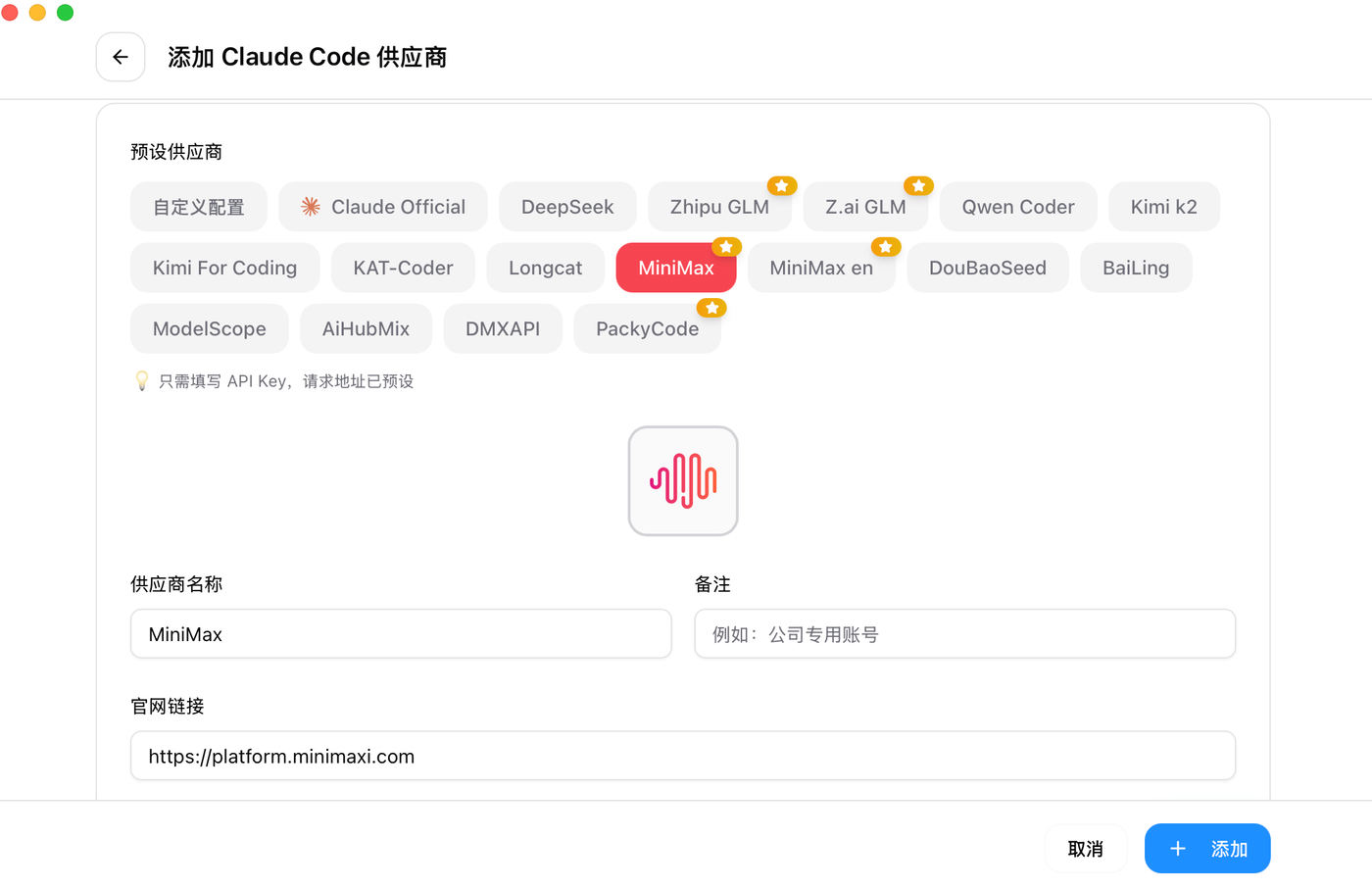
Figure: adding a Claude Code provider; choose the DeepSeek preset and fill in only the API key. Source: CC Switch, MIT License.
Claude Code reloads its configuration automatically; no restart is needed after switching. Run claude and it should work. If it doesn’t, first confirm the provider shows as “in use” in CC Switch, then check whether any stale ANTHROPIC_* environment variables remain in your terminal.
Codex: Switch to Codex at the top, click ”+”, choose DeepSeek, and paste the key. Note that DeepSeek uses the Chat Completions protocol while Codex natively supports only the OpenAI Responses API, so keep “requires local routing” enabled and let CC Switch translate the protocol on your machine.
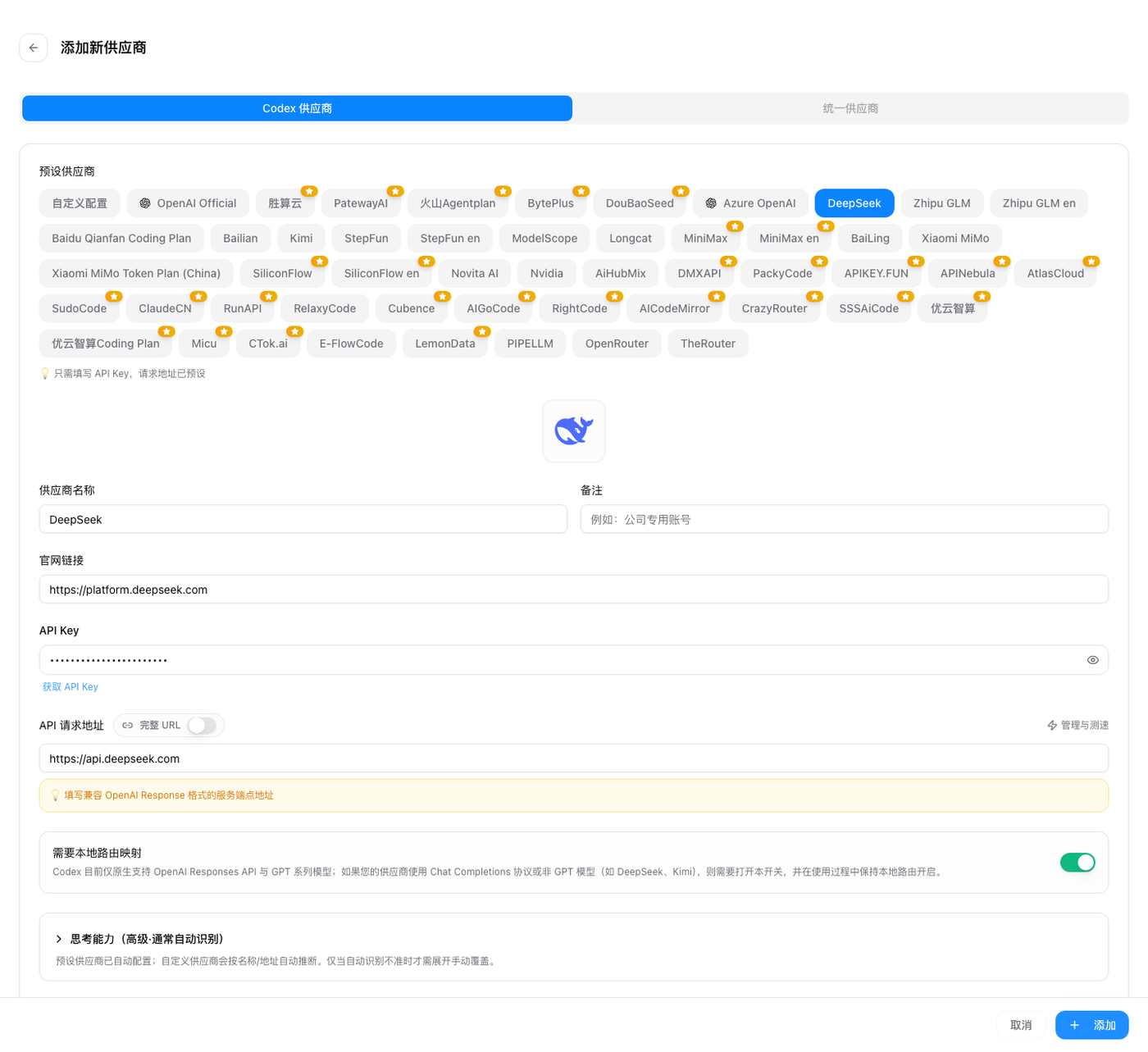
Figure: adding a Codex provider. DeepSeek requires “requires local routing” to stay enabled. Source: CC Switch, MIT License.
After adding, click “Enable,” then restart the terminal (Codex does not hot-reload configuration). Run codex in your project directory; if the startup message shows model: deepseek-flash or deepseek-v4-pro, it is working. Claude Code and Codex keep separate configurations, so each can use a different provider without affecting the other.
Two small reminders: download only from ccswitch.io or GitHub Releases, not from unknown mirrors. If behavior seems wrong after switching, switch back to the official provider in CC Switch first to determine whether the problem is configuration or the model. Manual configuration still works; DeepSeek’s official documentation covers Claude Code environment variables and Codex’s config.toml, and cc-switch is essentially writing those files for you.
At Flash peak pricing, a typical coding session with 200K input tokens (80% cache hits) and 30K output tokens costs: cache hits 0.16M × ¥0.04 = ¥0.0064, cache misses 0.04M × ¥2 = ¥0.08, output 0.03M × ¥8 = ¥0.24, about ¥0.33 total. The same volume on Pro is about ¥1.22, and idle hours are half price. For personal use, a few dozen CNY a month covers many runs; the real cost driver is an Agent looping endlessly or rereading large files. An API key is a wallet: if it leaks, someone else can spend your balance, so delete and recreate it immediately if you suspect exposure. For company data, confirm compliance requirements before sending anything to any model vendor.
Closing Thoughts
I hope this article gives you a sense of how AI can be applied to your work. If it turns out not to be as useful as the internet claims, that is normal too. Sometimes the model really is weak at that task; sometimes the way you are using it is the problem.
Usage boundaries
AI can help you draft, analyze, and write code, but it cannot take responsibility for you. Do not paste company secrets, customer lists, ID numbers, or unpublished code into any online model; confirm the provider’s data policy and your organization’s compliance requirements first. Conclusions about medicine, law, finance, or safety must be reviewed by a qualified person.
When letting an Agent perform write operations, start read-only and test on a small scope first; actions such as deletion, overwriting, sending email, or changing a database need backups and human confirmation. If you use AI-generated content in papers, reports, or coursework, label it according to your school or employer’s rules, and verify every cited fact yourself.
Treat AI as an assistant, not an authority. When it gets something wrong, the responsibility is still yours.
References
- Hello-Agents: Building Agents from Scratch
- Hello-Agents Chapter 1: Meet Agents
- OpenRouter model catalog
- DeepSeek models and pricing
- DeepSeek with Claude Code
- DeepSeek with Codex
- CC Switch
- MATLAB 2025a + MCP: Claude Code and Codex configuration notes
Image credits
- Tokenizer, RAG: Microsoft Generative AI for Beginners, MIT License.
- Multimodal: OpenAI CLIP, MIT License.
- OCR: PaddleOCR, Apache-2.0.
- Agent and loop diagrams: Datawhale Hello-Agents, Chapter 1, CC BY-NC-SA 4.0.
- MCP: Model Context Protocol documentation, CC BY 4.0.
- CC Switch: screenshots from the official repository, MIT License.
Comments
Join the conversation — sign in to leave a comment.
Login with GitHub